

JILIPark Withdrawal – Fast and Secure Cashouts
You’ve just won big and want to complete your JILIPark Withdrawal but not sure how to do it? Check out this guide below so you can cash out on your own while avoiding common mistakes and unwanted risks.
Steps to Withdraw Money at JILIPark
Below are the most basic steps for you to withdraw money safely and quickly. Please follow each step carefully to minimize any potential errors.
Step 1: Access the withdrawal interface
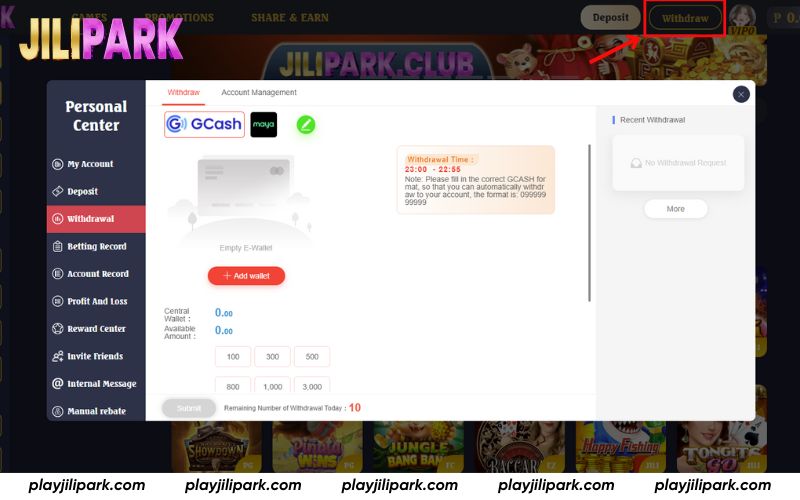
On the main screen, click Withdraw next to your avatar as shown by the red arrow in the image. Once selected, the system will open the withdrawal page and you can proceed to Step 2.
Step 2: Select your preferred withdrawal method
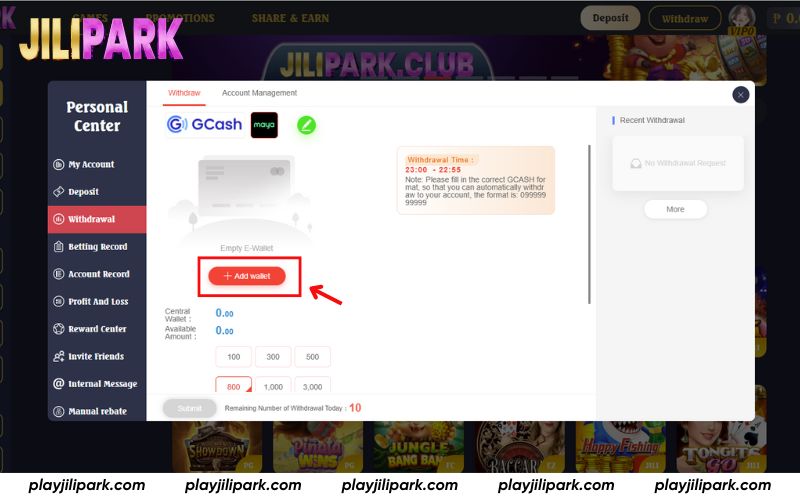
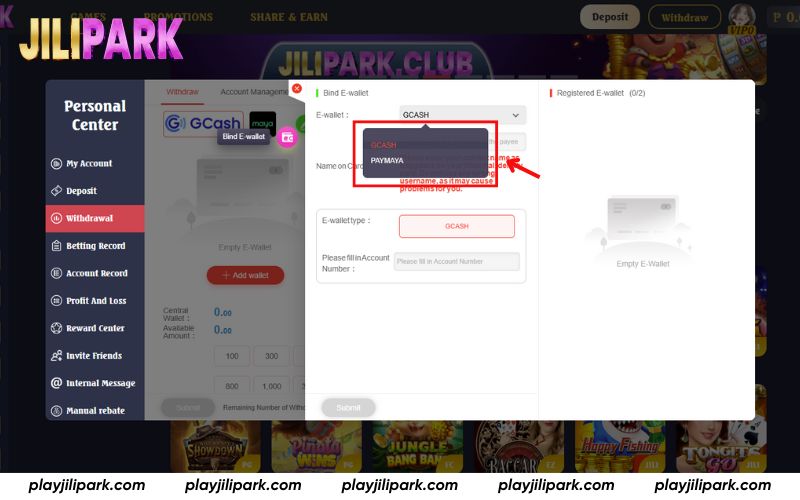
JILIPark offers two options for cashing out: via E-Wallet or Bank Account. If you haven’t connected any payout account yet, simply click + Add Wallet or + Add Bank Account to fill in your information.
Step 3: Enter the withdrawal amount and your transaction password
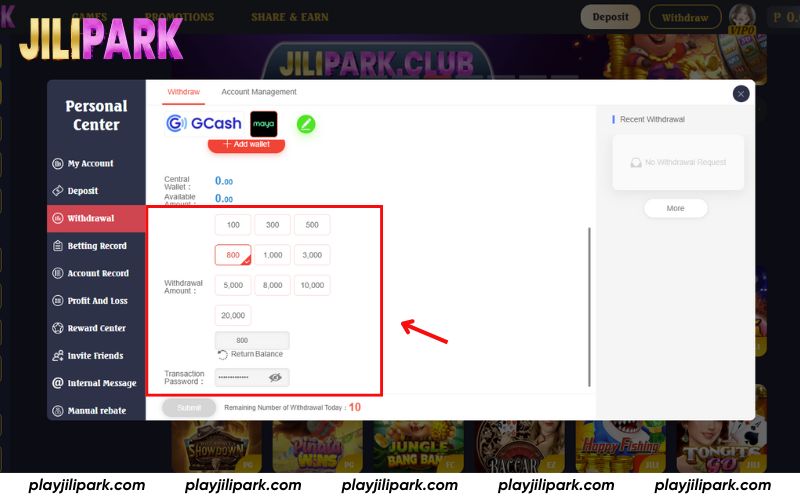
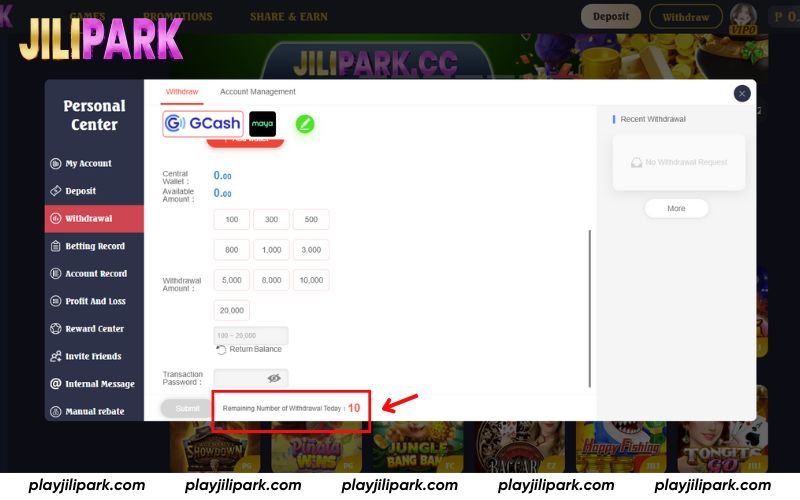
Fill in the desired amount in the Withdrawal Amount field. After that, input your Transaction Password and click Submit to complete the request.
Step 4: Monitor Your Withdrawal Status
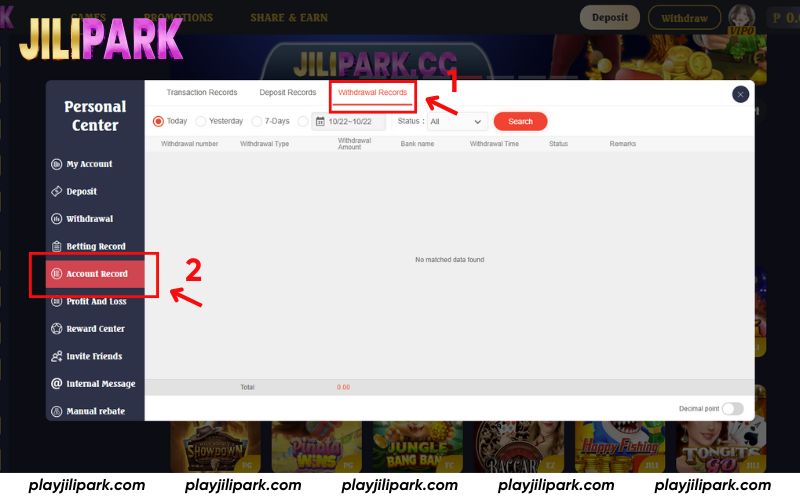
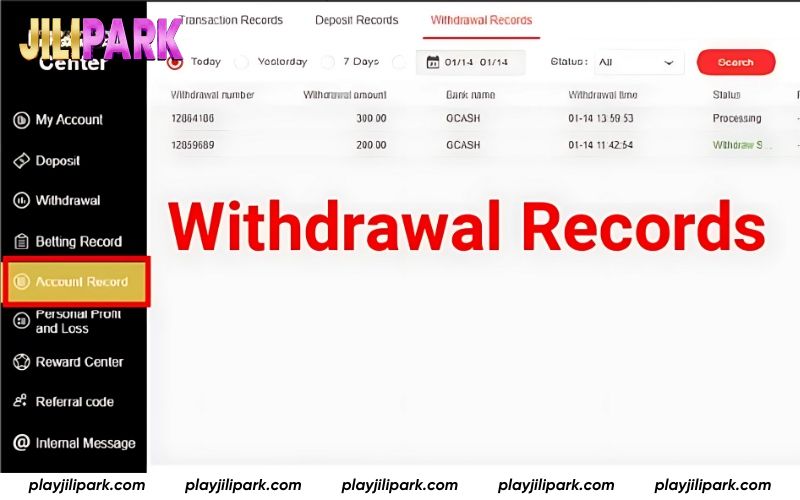
If your funds haven’t arrived yet, navigate to Account Record > Withdrawal Records to see the real-time progress. You can also review your complete withdrawal history from this section.
Important Reminders for Withdrawing from JILIPark
To make sure your withdrawal is smooth, secure, and processed without delays, keep these points in mind:
Withdraw during active banking hours
While JILIPark supports withdrawals 24/7, transactions are usually completed faster during regular bank operating hours. Requests made late at night or on public holidays may be processed the next business day depending on the bank’s schedule.
Daily withdrawal limit
Just above the Submit button, you’ll see your daily withdrawal limit. JILIPark currently allows up to 10 withdrawal requests per account per day. If you plan to make multiple smaller withdrawals, be sure to stay within this limit to maintain a seamless JILIPark Withdrawal experience.
Use your own registered bank account
For security, JILIPark only processes withdrawals to bank accounts that match the name on your JILIPark profile. Submitting a payout to someone else’s account can trigger a risk alert and the system may block the transaction.
Complete bonus requirements first
If you’ve activated any JILIPark bonus or promotion, be sure you’ve met the wagering (turnover) conditions before requesting a withdrawal. Always check your available withdrawal balance to ensure a fast and successful final step of your JILIPark Withdrawal.
FAQs about JILIPark Withdrawal
Got questions about JILIPark Withdrawal? Here are the most common concerns players have, explained clearly to help you withdraw with confidence.
How long does a JILIPark Withdrawal usually take?
Withdrawal speed varies depending on the method you use. In most cases, JILIPark processes transactions within 1 to 5 minutes. If there are temporary issues such as system congestion, network delays, or third-party processing, it may take up to 30 minutes.
Can I withdraw my winnings to GCash on JiliPark?
Yes, JILIPark supports GCash withdrawals. Just go to your E-Wallet settings and add your GCash account. When making a withdrawal, select E-Wallet, enter the amount, and confirm to proceed.
What are the withdrawal limits on JILIPark?
JILIPark does not set a limit on the total amount you can withdraw. However, each account is allowed up to 10 withdrawal requests per day.
How can I check if my JILIPark withdrawal was successful?
Simply go to Account Record > Withdrawal Records to view the status. In most cases, after pressing Submit, you will immediately see a confirmation message indicating that your withdrawal request has been received.
Can I withdraw through PayPal or other e-wallets on JILIPark?
At the moment, JILIPark supports withdrawals via GCash only. PayPal and other e-wallets are not yet available.
What should I do if I forget my transaction password?
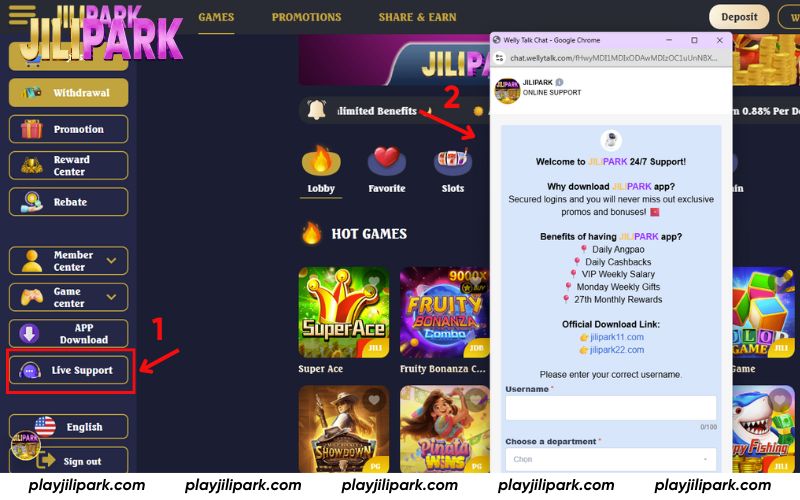
If you can’t remember your transaction password, reach out to JILIPark support via live chat, Facebook, Telegram or the official hotline. For the quickest response, we recommend using the live chat option to speak directly with an agent.
Conclusion
JILIPark has now provided a complete and detailed step-by-step guide for a smooth JILIPark Withdrawal process. If you have any questions, please contact our support team via Hotline or Telegram for the fastest assistance.